Hiring Process at Target: Stages from Application to Offer
By Synopsix · November 26, 2026 · 23 min read
Most guides to the hiring process at Target hand you a neat timeline: submit an application on Monday, expect a call by Friday, walk into the store for a friendly chat, and start the following week. That advice sets candidates up to panic when silence hits, or worse, to show up at a local store asking to speak with a manager who can't legally process a paper application.
Target doesn't run a single straight-line hiring sequence. It runs a centralized digital pipeline with conditional branch points that shift based on the store, distribution center, or headquarters team doing the hiring. One applicant lands a recorded video invite the same afternoon, while another waits in a recruiter queue for a phone screen, and a third skips the skills assessment altogether.
If you want to get hired, stop memorizing turnaround estimates that Target never published. Treat the pipeline as a map of decision gates instead. When you know what each gate evaluates, where the workflow splits, and how to respond at every stall, you stop guessing and start giving hiring teams the exact evidence they score against.
The Hiring Process at Target Stage by Stage
Every U.S. job application at Target starts online through its Workday system, replacing informal store-level applications with one standardized digital workflow. According to the [Target careers hiring process guide](https://corporate.target.com/careers/hiring-process), candidates create or sign in to a Workday account, submit their details, and move through position-specific screening steps before any offer or onboarding begins.
The table below lays out all nine stages in sequence. Because Target publishes no fixed waiting windows between steps, the wait column lists the actual operational factor that governs each gap rather than a fabricated day count.
| Stage | What happens | Where it happens | Typical wait | Your move | | --- | --- | --- | --- | --- | | Application | Create or sign in to your Workday account and submit resume and work history | Workday | Single online session at your own pace | Apply to the exact requisition and location you want | | Supplemental questions | Availability, shift preference, location and role-specific screening questions | Workday | Same session as the application | Offer the widest availability you can actually work | | Skills assessment | Short job-related assessment, used for some positions only | Workday, online | Tied to application session; no published turnaround | Complete it in one sitting on a stable connection | | Recruiter review | Recruitment team screens the application and may call to discuss the company, position and team | Phone or email | No published window; governed by site volume | Answer unknown numbers and check Workday messages daily | | Phone screen | Short conversation on availability, pay expectations and basic fit, sometimes booked through a self-scheduling tool | Phone | No published window; set by recruiter availability | Have availability, pay range and start date ready | | Interview | Phone, video, in person or recorded video, in one or more rounds | Phone, video, recorded portal, store, distribution center or HQ | No published window; set by role and location | Bring STAR evidence for the five competency areas | | Offer | Target extends an offer, which you acknowledge in Workday | Workday | No published window; follows final interview sign-off | Read pay, hours, shift, start date and location before accepting | | Pre-hire tasks | Paperwork and pre-hire tasks in the Candidate Homepage, plus a drug screen where the role requires one | Workday Candidate Homepage and vendor site | No published window; tied to task and vendor turnaround | Complete each task the day it appears | | Onboarding | Orientation, first-week training and system setup | Store, distribution center or HQ | Starts on your hire date | Confirm your first shift and reporting location |
Three Rules That Change How You Use This Map
Looking at nine rows in order can still trick you into expecting a rigid march from top to bottom. Three operational facts govern how Target moves people through those stages.
First, everything after you hit submit runs through the Workday Candidate Homepage. Status updates, recruiter messages, formal offer letters, and pre-hire checklists all land there first. Bookmark that portal immediately after applying and treat it as your primary source of truth instead of waiting passively on your email inbox.
Second, interview formats and round counts change by job family and site. A seasonal store team member requisition moves through a very different evaluation sequence than a distribution center operations lead or a Minneapolis corporate role. For a broader view of how large multi-stage recruiting funnels organize screening gates across roles, the [Eztrackr candidate pipeline guide](https://www.eztrackr.app/blog/recruitment-process-workflow) breaks down how modern workflows pair standardized tracking with role-specific evaluations.
Third, Target publishes no standard end-to-end timeline. A busy store trying to staff overnight inbound shifts may move fast, while a corporate team coordinating multiple leaders can take far longer between touchpoints. Checking your status regularly and keeping your application materials ready beats chasing someone else's reported wait time.
> Practical rule: Bookmark your Workday Candidate Homepage before you close the browser tab after applying, because every offer acknowledgment and pre-hire task lives inside that single dashboard.
How to Apply for a Job at Target in Workday
Applying through Workday is straightforward on the surface, yet small data-entry shortcuts knock strong candidates out before a recruiter ever reads a resume. The graphic below outlines the core five-part submission path inside the platform.
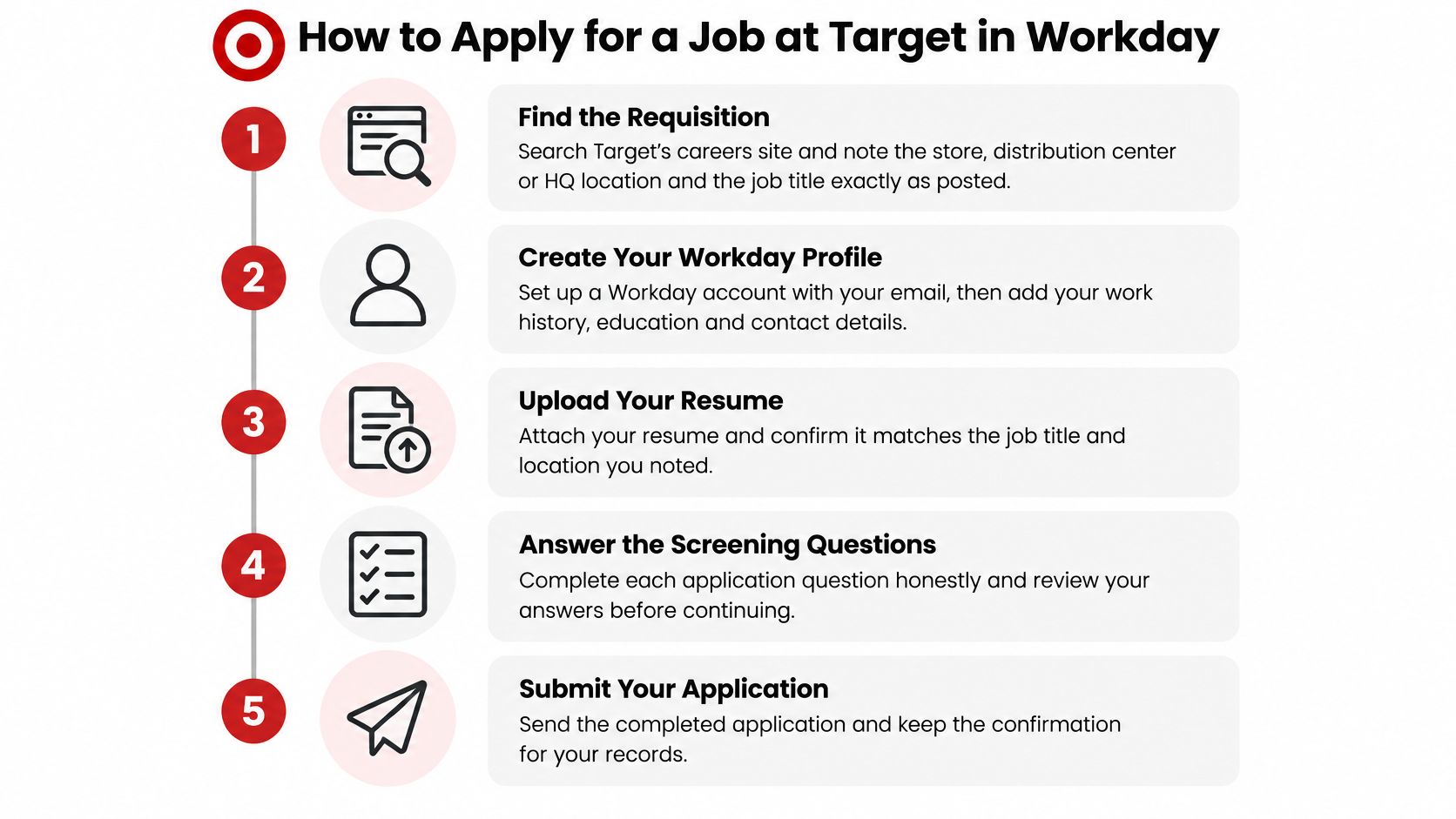
Follow these six steps to make sure your profile survives both automated screening and human review:
1. Locate the exact requisition. Search Target's careers site and write down the posted job title alongside the exact store number, distribution center, or headquarters location. Target opens requisitions at the site level, so knowing the exact posting stops you from mixing up interviews if you apply to multiple locations. 2. Set up one permanent Workday account. Register with a personal email address you'll still monitor six months from now. One Workday login carries every application you ever submit to Target, and creating duplicate accounts fragments your history and hides status updates. 3. Upload your resume and fill in every work-history field manually. Many applicants upload a PDF and skip the form boxes, or leave broken parser text untouched. Recruiters review the structured Workday fields side by side across candidates while the software reads your attachment, so enter every past job with clean dates and hours worked per week. 4. Enter realistic shift and availability preferences. Be honest about the days, mornings, evenings, and weekends you can work. Store and facility leaders filter candidates directly against open shift gaps, and promising wide-open hours you can't keep only gets an offer rescinded later. 5. Finish any triggered skills assessment in the same session. Some requisitions route you straight into a short job-related assessment before final submission. Set aside uninterrupted time on a reliable Wi-Fi connection so the browser doesn't drop your session halfway through. 6. Submit, check the portal, and archive your receipt. Verify that your requisition shows as submitted inside the Workday Candidate Homepage, then save the confirmation email. That receipt holds your requisition ID if you ever need to reference it with a recruiter.
Handling Workday Edge Cases Without Losing Progress
Candidates often stumble on four technical quirks inside Target's application system. Knowing how to handle them upfront saves hours of rework.
What the Target Skills Assessment Measures
Not every applicant encounters a skills assessment during the hiring process at Target. Depending on the specific requisition, Target may include a short online assessment measuring job-related skills during the application window, while other roles skip straight to recruiter review. The screenshot-style setup below captures the quiet, focused environment you want before opening an assessment screen.
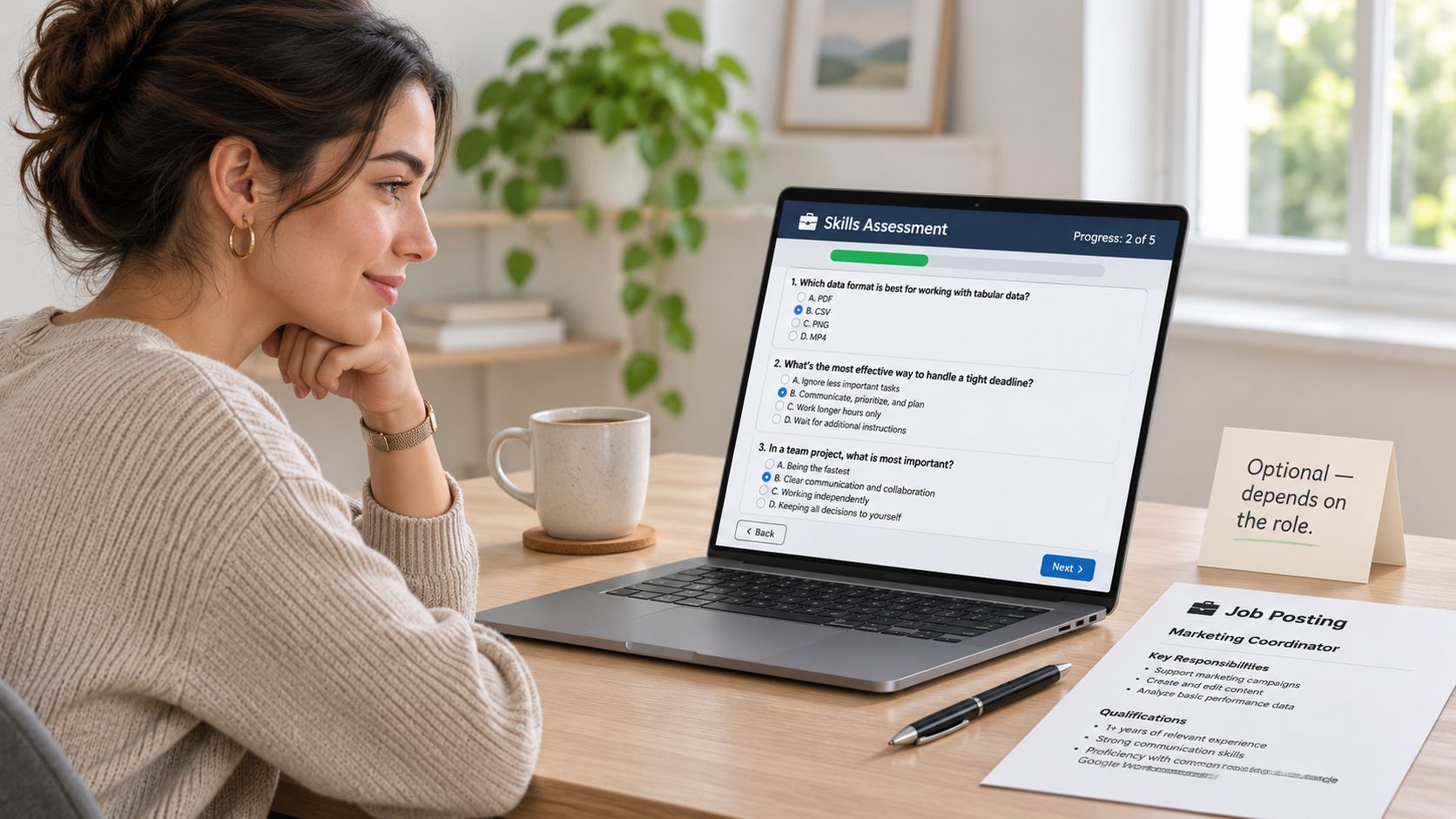
Target doesn't publish the exact item types, scoring weights, or pass thresholds for its assessments. Anyone selling a guaranteed "Target test answer key" online is guessing, and chasing leaked answers usually backfires by creating contradictory responses across similar scenarios. I'd treat the test strictly as a job-related work sample, not a generic personality quiz.
Decades of selection research explain why employers link assessments tightly to job demands rather than broad personality labels. A landmark [meta-analysis published in Personnel Psychology](https://onlinelibrary.wiley.com/doi/abs/10.1111/j.1744-6570.1991.tb00696.x) covering 494 studies and 97 independent samples, totaling 13,521 participants, found a corrected mean validity of 0.29 for personality measures in confirmatory research compared with 0.12 in exploratory studies, and mean validity climbed to 0.38 when researchers explicitly used job analysis to select the measured dimensions.
Context matters just as much as job analysis. A separate [personnel-selection research review](https://research.vu.nl/ws/files/278187338/Personality_Personnel_Selection_and_Job_Performance.pdf) found that non-contextualized personality measures averaged validity of 0.11 (ranging from 0.02 to 0.22), whereas contextualized measures tied to specific work settings and role demands averaged 0.24 (ranging from 0.14 to 0.30). Predicting human behavior for smarter people decisions depends on anchoring behavioral signals to the actual workplace rather than slapping generic traits onto a candidate.
That principle shapes how modern assessment teams operate behind the scenes. At Synopsix, we start by absorbing the organization's Org DNA, including culture, values, and business priorities, together with the assessments already run, so behavioral signals map directly to the work. If you want a deeper breakdown of how employers structure and validate pre-hire testing, review our guide to the [hiring assessment test](https://synopsix.ai/blog/hiring-assessment-test).
Before you launch any pre-hire assessment, watching how employers weigh situational judgment and consistency helps you avoid rushed mistakes.
<iframe width="100%" style="aspect-ratio: 16 / 9;" src="https://www.youtube.com/embed/fYNu0_pXjFM" frameborder="0" allow="autoplay; encrypted-media" allowfullscreen></iframe>
Practical Answering Rules for a Job-Related Work Sample
Because the score is evaluated against real shift and role expectations, your strategy should prioritize accuracy and consistency over trying to outsmart the algorithm.
Honest answers serve both sides of the table. An assessment designed around real job demands filters out mismatches before you end up stuck in a shift pace or work style you hate.
The Interview Stage and the Five Competencies Target Scores
Once your application clears screening, the evaluation shifts from Workday data to structured behavioral evidence. According to the [Target interview guide](https://corporate.target.com/careers/hiring-process/interview-guide), Target structures its interviews around five published competency domains: relevant preparation, collaboration across differing perspectives, problem solving, relationship building, and measurable impact.
Interviewers ask for specific examples of past behavior or ask how you'd handle comparable business problems. They're looking for observable actions you took, not polished speeches about your work ethic. Research backs up why large employers lock down interview structure so tightly: a [review of interview-validity research](https://ou.edu/russell/pdf/Interview.pdf) reported that predictive validity rose from 0.20 at the least structured level to 0.57 at the most structured level, a net improvement of 0.37 gained by controlling question content, sequence, and pre-set scoring criteria.
| Competency | What is being tested | Question you may hear | What strong evidence contains | | --- | --- | --- | --- | | Relevant preparation | Whether you understand the role, the store or facility and Target as an employer | What do you know about this role and why Target? | A specific detail about the store, facility or role plus how your experience maps to it | | Collaboration across differing perspectives | Whether you can work with people who disagree or work differently | Tell me about a time you disagreed with a coworker | The other person's position stated fairly, the action you took, what changed | | Problem solving | How you diagnose a problem and act with incomplete information | Describe a problem you solved with limited information | What you knew, the option you chose and why, the measurable result | | Relationship building | How you build trust with customers, teammates or a manager | Tell me about a time you turned around an unhappy customer | What you did, how the person responded, whether they came back | | Measurable impact | Whether you can point to an outcome rather than an activity | Give an example of a result you are proud of | A number, a timeframe and what you learned from it |
Building a STAR Story Bank Before Your First Call
Walking into a behavioral interview hoping the right memory pops into your head is a gamble. Before any screening call, I recommend drafting six to eight concise STAR stories on paper, aiming for roughly ninety seconds each when spoken aloud. Map at least one story directly to each of Target's five competencies, and keep two spare stories ready in case an interviewer asks a follow-up prompt in the same domain.
Every story needs three crisp components:
1. Situation and Task: Two sentences setting the scene and the concrete stakes. Skip long backstory about company history or coworker drama. 2. Action: The exact steps you personally took. Swap vague "we" phrasing for "I checked," "I reorganized," or "I escalated," so the interviewer can attribute the behavior directly to you. 3. Result: A measurable outcome, timeframe, or concrete shift in behavior, paired with one sentence on what you learned.
How Scoring Rubrics Judge Your Answers
Hiring teams operationalize behavioral prompts using a four-level scoring scale to keep evaluations consistent across managers:
Aim for steady 3s and 4s across all five domains rather than chasing one dazzling 4 while scoring a 2 somewhere else. Structured rubrics don't let one impressive anecdote erase a blank spot on problem solving or collaboration. Hiring managers who design these rubrics also watch for score drift across interviewers, since Target publishes no interviewer agreement or selection-validity figures publicly; our breakdown of [interview question design](https://synopsix.ai/blog/interview-question-design) explores how calibrated rubrics keep scoring fair.
> One charismatic story won't rescue a scorecard if you leave another competency with vague or hypothetical evidence.
Three Failure Modes That Sink Qualified Candidates
Even experienced applicants drop points on the same three mistakes. First, answering with hypotheticals ("I would stay calm and talk to my manager") instead of naming a real past event starves the rubric of behavioral proof. Second, recycling one favorite story across three different prompts signals thin experience and forces interviewers to score repeated competencies lower. Third, treating "different perspectives" as culture-fit similarity misses the entire point of the competency; interviewers want proof that you worked productively alongside someone who disagreed with your approach, not someone who shared your habits.
Phone, Video, In Person and Recorded Interviews
Target adapts its interview format to the role, hiring volume, and site, meaning you might face a quick recruiter phone call, a live video chat, an asynchronous recorded video, an on-site visit, or a multi-person panel. The format changes the room and the camera, not the underlying evaluation standard.
A [2021 meta-analytic reanalysis of personnel-selection research](https://gwern.net/doc/statistics/meta-analysis/2021-sackett.pdf) estimated corrected validity at 0.45 for structured interviews compared with 0.18 for unstructured interviews. That gap exists because standardized formats ask every applicant comparable, job-relevant questions and grade them against consistent criteria instead of off-the-cuff impressions. Whether you're speaking into a phone receiver or a laptop webcam, carry the exact same prepared stories and numbers into every round.
| Format | When it shows up | How to prepare | Common failure | | --- | --- | --- | --- | | Phone screen | Early in the process, often with a recruiter, sometimes self-scheduled | Quiet room, availability and pay range written out, resume in front of you | Taking the call in a noisy place or losing signal | | Video interview | Common for store leadership, distribution and HQ roles | Test camera and microphone, light your face, put notes at eye level | Reading a script and never looking at the camera | | In-person interview | Store, distribution center and HQ final rounds, sometimes including a walk through the facility | Arrive ten minutes early with ID and printed resume copies | Ignoring the customer-facing environment you just walked through | | Recorded video | Roles where hiring teams review many candidates asynchronously | Rehearse one answer on camera and watch the timer | Running out of time before reaching the result | | Panel or group interview | Leadership and corporate roles with several interviewers | Learn each interviewer's role and address answers to all of them | Answering only to the most senior person in the room |
Controlling the Logistics That Decide Close Calls
Technical friction and poor room setup distract evaluators from strong answers. Treat each format's logistics as essential preparation.
For a phone screen, sit in a quiet room with strong cell reception, your resume open in front of you, and your realistic shift availability, start date, and pay range written on a single sheet. Don't take the call from a parked car with the engine running or while walking through a noisy store.
For a live video interview, test your microphone and camera fifteen minutes early, place a lamp behind your screen so your face is clearly lit, and tape brief bullet cues right next to your webcam lens. Glancing down at full paragraphs on a notepad breaks eye contact and makes your delivery sound rehearsed.
For an in-person interview, plan to arrive ten minutes early with government-issued ID and clean printed copies of your resume. If your visit includes a walk across the sales floor or through a distribution wing, pay close attention to store layout, signage, guest traffic, and safety markers. Referencing a specific observation you noticed during that walk gives you immediate proof of preparation.
For a recorded video interview, practice one full answer on your phone or laptop while watching a countdown clock. Most candidates burn too much time setting up the backstory and get cut off before stating the measurable result, which caps their rubric score.
For a panel interview, jot down each interviewer's name and function at the start. Start your answer by making eye contact with the person who asked the question, then sweep your attention naturally to every other panelist so nobody feels sidelined. Our analysis of [how many interviews is too many](https://synopsix.ai/blog/how-many-interviews-is-too-many) unpacks how multi-round schedules balance signal against candidate fatigue, where extra rounds add value, and where they stall pipelines.
What Silence or a Delayed Screening Means
Most candidate frustration in the hiring process at Target comes from operational uncertainty rather than brutal interview questions. Applicants finish a video screen or submit a background form, hear nothing for days, and assume they failed.
The [Target careers FAQ](https://corporate.target.com/careers/faqs) confirms that some jobs or recruiters use a scheduling tool to book phone screens, in-person interviews, mandatory drug screens, and other application appointments. What Target doesn't publish is a standard turnaround timeline or an official follow-up clock. Because workflows branch at recruiter discretion and vary by site volume, silence rarely means a single thing.
Judge any pause against the specific stage you're sitting in, using the diagnostic guide below.
| Situation | What it likely means | What to do | | --- | --- | --- | | No status change 5 business days after applying | Application is in the recruiter review queue or the requisition is on hold | Check the Candidate Homepage status and keep applying to other requisitions | | A scheduling tool contacts you | Some jobs and recruiters use a tool to book phone screens, interviews and drug screens | Book the earliest slot you can actually attend and confirm it | | Silence for a week after the interview | The team is comparing candidates or waiting on another interviewer | Send one short thank-you and status note to the recruiter | | Background check or drug screen delayed | Vendor turnaround or a missing document | Reply to vendor emails the same day and keep your receipts | | No interviews offered after several applications | Availability or shift preference does not match what the site needs | Update availability in Workday and tell the recruiter directly | | Rejected after a final interview | Usually role, shift or timing specific rather than a permanent bar | Ask once for feedback, then reapply after six months or to another location |
Branch Points That Quietly Stall Applications
Four operational branch points explain most unexpected delays, and none of them have anything to do with your personality.
First, shift availability mismatch stalls more store and distribution applications than weak resumes do. If a store needs weekend closers and your Workday profile blocks out Saturdays, your application can sit untouched while the site fills that exact shift.
Second, requisition holds happen routinely when store budgets shift, seasonal forecasts change, or an internal transfer claims the slot. Your status stays open in Workday while nobody schedules interviews.
Third, third-party screening delays frequently stem from a single unanswered email from a background-check or testing vendor sitting in your spam folder. Check junk mail daily once pre-hire screening begins, and save every confirmation receipt from testing sites.
Fourth, technology or accessibility hurdles during a recorded video or online assessment can leave an application stuck in an incomplete queue. If a portal glitches or you need an alternative format, notify the recruiter listed on your invite immediately rather than waiting for the deadline to expire.
A Clean Follow-Up Cadence
Keep your outreach disciplined: send one short, specific message per stage, spaced roughly five business days apart, exclusively to the recruiter named in your Workday correspondence. State the exact requisition title, location, and date of your last step, then ask politely for an updated timeline. Never email multiple company addresses or message store leaders separately about the same open requisition, because duplicate outreach slows coordination rather than speeding it up.
> Reality check: The stall explanations and five-day follow-up spacing above reflect common candidate patterns and practical coaching guidelines, not confirmed Target corporate policy.
Accept the Offer and Complete Your Pre-Hire Tasks
When Target selects you, the offer arrives digitally inside Workday, and your pre-hire checklist activates immediately inside the Candidate Homepage. Delays at this final gate can push your start date back by a full pay cycle, so treat the first 48 hours after an offer lands as an active sprint.
Run through these five tasks in order during your first 48 hours:
1. Read the entire offer letter line by line. Confirm the hourly pay rate or salary, expected weekly hours, shift assignment, official start date, and exact store, distribution center, or headquarters address before you click accept. 2. Ask clarifying questions before acknowledging the offer. Once you acknowledge in Workday, pre-hire workflows trigger automatically against those terms. If anything about your shift or start date looks off, message the recruiter first so they can correct it cleanly. 3. Clear every pre-hire task the same day it appears. Tax forms, policy acknowledgments, and onboarding questionnaires drop into the Candidate Homepage in batches. Logging in daily prevents a single unchecked box from blocking your orientation slot. 4. Book any mandatory drug screen immediately. If your specific role requires a drug screen, schedule the earliest clinic slot you can make and keep the collection receipt until your recruiter confirms clearance. 5. Gather the identity documents listed on your onboarding checklist. Pull original, unexpired verification documents together early so you aren't scrambling the morning before orientation.
Crossing From Candidate to Day One
Before your hire date arrives, confirm your first shift time, dress code expectations, and exact reporting entrance with your hiring contact, since onboarding runs locally at your assigned store, distribution center, or headquarters office. Keep your Workday account credentials active even after you start, because the same login anchors your application history and employment records.
From the employer's side of that final decision, speed and rigor matter just as much as they do for the candidate. Strong hiring teams pair structured interviews with selection and hiring analysis that evaluates a candidate against the role, team, leader, and culture, predicts integration risk, and proposes targeted questions for the final interview. At Synopsix, we help teams deliver a defensible hiring call in under 48 hours so strong candidates aren't left waiting in limbo while competitors move faster.
For now, your job as an applicant is straightforward: monitor your Workday Candidate Homepage daily and complete every pre-hire task the exact day it appears.
---
If you're leading hiring teams and want the consistency of a structured enterprise pipeline without slow guesswork, we built [Synopsix](https://synopsix.ai) to turn validated behavioral assessments into clear role-specific intelligence reports and team simulations. Visit our site to see how our platform predicts human behavior, surfaces integration risks before an offer goes out, and helps organizations make smarter people decisions in under 48 hours.