Workforce Planning Analytics: A Practical Guide for HR
By Synopsix · September 13, 2026 · 17 min read
Early workforce planning analytics was largely a reporting exercise. Research summarized by [Horsefly Analytics](https://horseflyanalytics.com/) describes an early environment in which roughly 70% of organizations relied on basic reporting and ad hoc analysis, while fewer than 10% used advanced analytical capabilities for workforce decisions. Traditional teams also spent up to 80% of their analytical effort gathering and cleaning data, leaving too little time for interpretation and action. The practical lesson is uncomfortable: many workforce dashboards look modern while the decision process behind them still runs on spreadsheets, intuition, and delayed budget reconciliations.
Workforce planning analytics earns its value when it connects talent supply, business demand, capability gaps, and labor cost to choices that Finance and operating leaders can approve. A useful model doesn't stop at “how many people do we have?” It answers which roles are needed, which skills can be redeployed, what attrition could change the plan, and how each option affects the P&L.
What Workforce Planning Analytics Actually Means
For years, HR teams documented what had already happened. They reported headcount, turnover, vacancies, and compensation after the quarter closed. Workforce planning analytics shifts that work toward predictive decision support, connecting headcount, turnover, compensation, and skills data to future staffing requirements, as the historical transition described by [Horsefly Analytics](https://horseflyanalytics.com/) shows.
The distinction matters:
A practical model combines internal workforce records with external labor-market signals. Core inputs usually include current headcount, role family, tenure, compensation, skills, attrition, internal movement, recruiting pipeline, and labor cost. External inputs add information about skill availability, wage pressure, competitor demand, and location feasibility.
Start with the decision, not the dashboard
The strongest programs begin with a business question. A product leader might ask whether a roadmap can be staffed without delaying launch. A CFO might ask whether a hiring request is affordable under a lower-growth scenario. A CHRO might ask whether a critical capability can be built internally before external hiring becomes necessary.
The answer should produce an action, not another visual. That action might be a hiring requisition, a redeployment recommendation, a reskilling investment, or a budget adjustment. Even specialized operating problems, such as [restaurant workforce optimization](https://anchops.com/blog/what-is-workforce-optimization/), benefit from the same logic: connect labor demand, available capacity, scheduling constraints, and cost before managers make reactive staffing decisions.
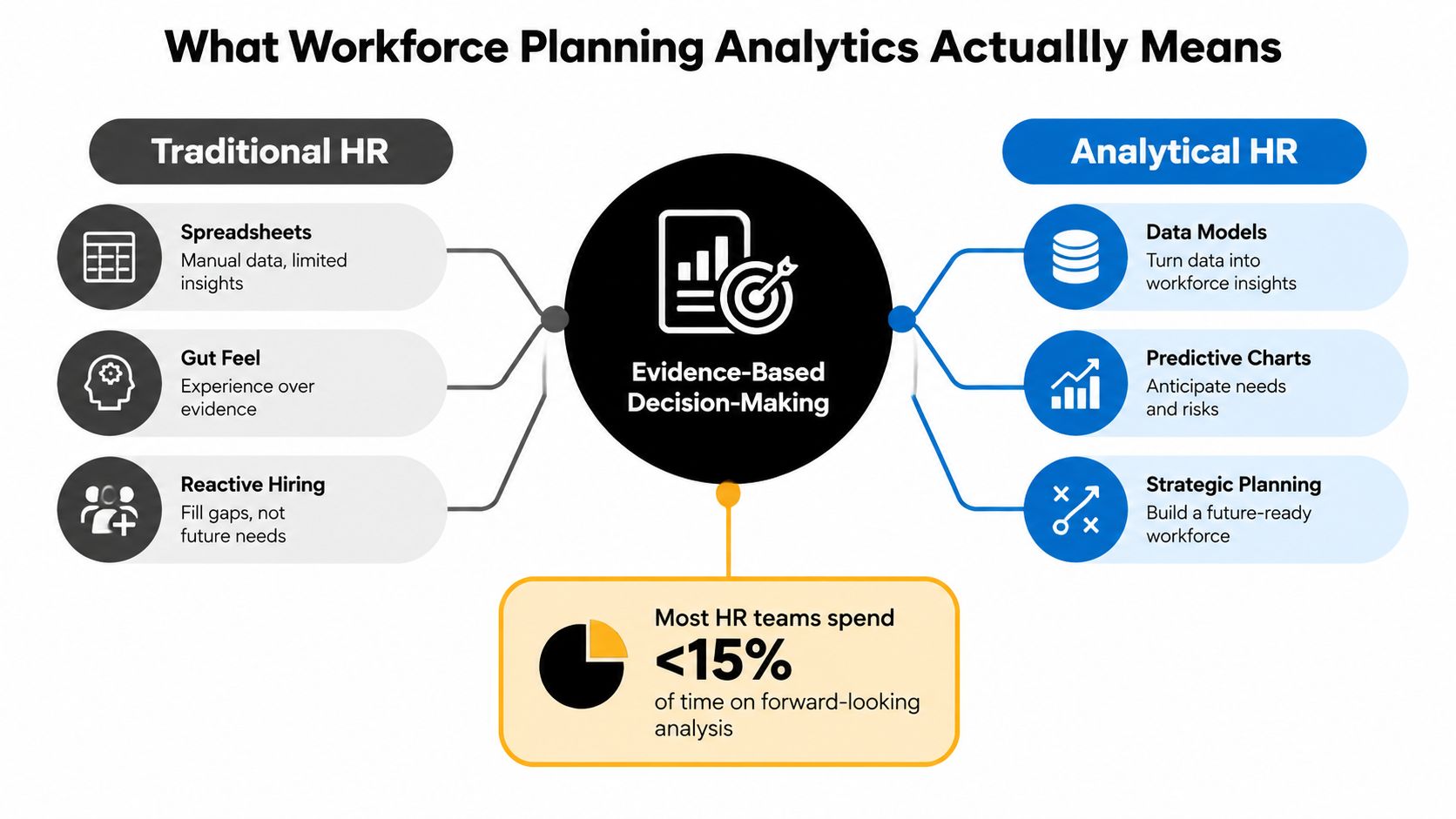
The target isn't a perfect forecast. It's a repeatable system that turns changing business assumptions into visible workforce and financial consequences.
From Descriptive Dashboards to Predictive Decisions
A dashboard becomes useful only when it changes a workforce or P&L decision. A trend line labeled “predictive” does not meet that test. The practical questions are who owns the decision, which assumptions drive the result, and what action follows.
Four layers in practice
Descriptive analytics answers what happened. A quarterly report can show voluntary attrition in engineering, vacancies by role family, or labor cost against plan. That supports a board update, but it does not explain the cause or show whether finance should release, delay, or reallocate budget.
Diagnostic analytics asks why it happened. Analysts can compare attrition by manager tenure, compensation position, role family, location, or promotion history. The aim is to narrow the problem, such as identifying retention pressure among experienced specialists instead of treating all engineering turnover as one event.
Predictive analytics estimates what may happen next. It uses historical workforce data, statistical modeling, and machine learning to forecast outcomes such as turnover risk, skills gaps, performance trends, and staffing needs, as explained in [Visier's guide to predictive HR analytics](https://www.visier.com/blog/predictive-hr-analytics/). A role-level forecast can help a CHRO prioritize retention funding, while finance can test the cost of that response against a lower-growth assumption.
Prescriptive analytics recommends what to do. It compares targeted retention spending, internal mobility, external hiring, contractor use, or training with the expected capability gap and financial effect. The output should support a specific choice: approve a role, move an employee, fund a development path, or change the delivery plan.
| Layer | Question It Answers | Workforce Planning Example | Decision It Enables | |---|---|---|---| | Descriptive | What happened? | Actual headcount, vacancies, and attrition by function | Report performance and identify variance | | Diagnostic | Why did it happen? | Attrition patterns by role, tenure, manager, or compensation position | Focus investigation and prioritize root causes | | Predictive | What is likely to happen? | Expected attrition or skill shortages by cohort | Protect critical roles and adjust hiring plans | | Prescriptive | What should we do? | Compare redeployment, reskilling, hiring, and retention options | Approve a financially and operationally defensible action |
The final two layers require more judgment than reporting. Forecasts depend on assumptions about demand, hiring pace, productivity, and cost. Make those assumptions visible, then translate each scenario into a budget request, a hiring change, or a delivery adjustment that finance can test. A useful [guide to predictive analytics in HR](https://synopsix.ai/blog/predictive-analytics-in-hr) also helps teams move from descriptive reporting toward forward-looking workforce decisions.
The Metrics That Matter for Workforce Planning
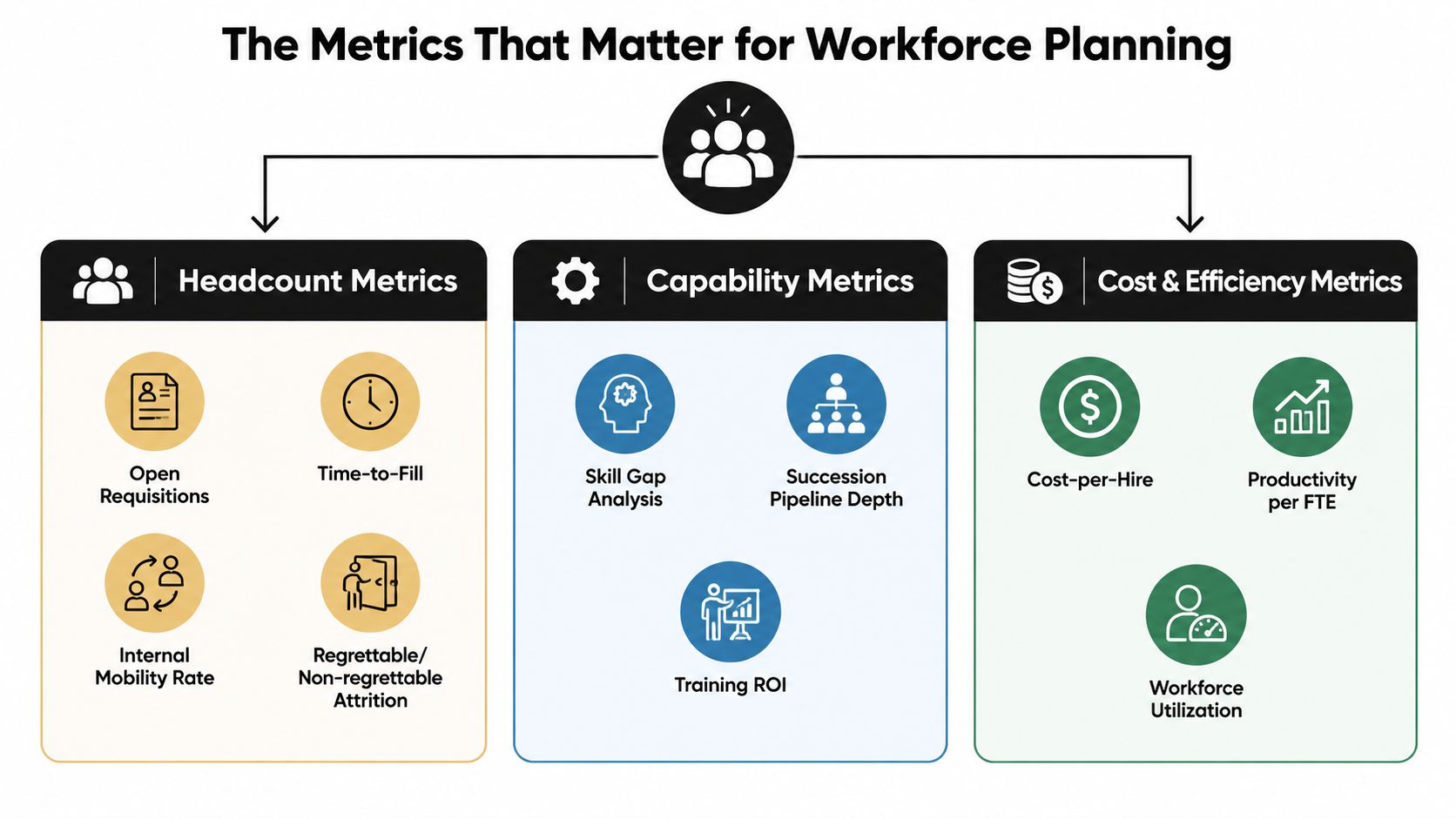
A workforce plan becomes useful when its metrics connect directly to a staffing or budget decision. I group the measurement system into headcount, capability, and financial metrics, then assign each metric an owner, forecast horizon, and decision trigger.
Headcount metrics
Track open requisitions, time-to-fill, internal mobility, and attrition by role family. Separate regrettable from non-regrettable attrition. One turnover rate can hide the loss of scarce capability while inflating the importance of routine movement.
Compare planned and actual employees by function, level, location, and employment type. The management question is whether the team has the capacity and role mix required for its workload. A variance only matters when it changes delivery capacity, hiring need, or labor spend.
Capability metrics
A skills taxonomy makes workforce analysis usable beyond job titles. Measure critical-skills coverage, succession pipeline depth, redeployment adjacency, and proficiency changes over time. Connect each measure to a choice, such as external hiring, employee development, internal movement, or a change in work design.
Capability coverage should also show where a gap affects customer delivery or revenue, rather than treating every missing skill as equally urgent.
Financial metrics
Finance needs fully loaded labor cost, cost per hire, hiring ramp cost, and productivity per FTE expressed through revenue or another relevant output. These measures link the people plan to the operating plan and give finance a basis for testing funding requests.
Forecast quality is measured against actuals, not dashboard polish. Use MAPE, or mean absolute percentage error, for headcount and cost forecasts, and review it monthly. Stable business units may target below roughly 8% MAPE, while high-volatility segments may need a tolerance of 12% to 15%, according to the workforce forecasting guidance from [UC Today](https://www.uctoday.com/talent-hcm-platforms/workforce-forecasting-model-broken-costing-talent/). These thresholds are control points, not guarantees. A low average error can still conceal systematic bias in a critical role family.
The practical test is financial: can the metric support a decision about approving a role, funding development, changing hiring pace, or adjusting the delivery plan?
Where the Data Comes From and How to Trust It
A workforce forecast is only as credible as the definitions, ownership, and timing behind its inputs. Internal systems describe the workforce. External intelligence adds context about the labor market, but neither source answers every planning question.
The HRIS should own employee identity, headcount, compensation, tenure, reporting relationships, and organizational movement. The ATS and recruiting CRM contribute requisition status, funnel conversion, source performance, and candidate flow. Finance and ERP systems connect the plan to labor cost, revenue, productivity, and budget data. LMS and skills platforms can add learning activity, capability inventories, proficiency evidence, and development progress.
| Source Category | Examples | Refresh Cadence | Primary Use | Key Limitation | |---|---|---|---|---| | HRIS | Employee and organization records | Depends on system process | Headcount, tenure, compensation, movement | Missing or inconsistent fields | | ATS and CRM | Recruiting pipeline systems | Often event-driven or scheduled | Hiring demand and funnel conversion | Incomplete activity capture | | Finance and ERP | General ledger and planning systems | Finance-controlled cycles | Labor cost, budget, revenue, productivity | Accounting categories may not match HR roles | | LMS and skills platforms | Learning and capability tools | Scheduled or user-driven | Skill inventory and development | Self-reported or stale proficiency | | Labor-market intelligence | BLS, ONET, LinkedIn Talent Insights, Burning Glass, wage surveys | Varies by provider | Supply, demand, wages, location | Licensing and coverage constraints |
External data earns a place in the model when internal history is too narrow or slow. BLS, ONET, LinkedIn Talent Insights, Burning Glass, and regional wage surveys can inform labor availability, skill definitions, compensation context, and location choices. Assess each source by refresh cadence, market coverage, methodology, licensing terms, and whether the organization can retain and reuse the data.
A trust framework
Set reconciliation rules before producing a forecast. Define which system owns employee status, how contingent workers appear, how transfers are dated, and how cost centers map to departments. Add timeliness thresholds so stale skills or compensation records cannot drive a current funding decision.
Every critical field needs lineage, an owner, a refresh timestamp, and a fallback. A workforce model should not depend on one unverified source for a material input. Teams working with behavioral or assessment data can apply the same discipline described in [psychometric data analysis](https://synopsix.ai/blog/psychometric-data-analysis), where consistent definitions and careful interpretation matter more than adding fields.
Finance also needs a usable reconciliation path. If HR headcount does not match the finance ledger, document whether the difference reflects contractors, vacancies, timing, or accounting treatment. Otherwise, a hiring request can look like a forecasting error when it is a classification problem.
For sales hiring, a guide to the [best place to hire SDRs](https://lathire.com/hire-sdr/) may provide market context. It should supplement, not replace, the organization's own analysis of labor cost, capacity, hiring conversion, and expected ramp.
Building Models That Survive a Bad Quarter
Annual headcount plans fail when business conditions shift faster than the planning cycle. A resilient model treats workforce supply as changing capability capacity, then connects each change to delivery, cost, and P&L exposure.
Start with a skills taxonomy that links tasks, roles, and capabilities in one shared structure. The [Deloitte and Anaplan strategic guide](https://www.deloitte.com/content/dam/assets-zone3/us/en/docs/alliances/2026/deloitte-anaplan-wfp-ai-strategic-guide.pdf) recommends combining verified internal skills inventories with external labor-market intelligence and testing base, growth-spike, and shock scenarios. The practical test is whether the model can turn a capability gap into a budget action, such as redeployment, delayed work, contractor use, or a targeted hire.
Build the supply model
Refresh supply continuously. Start with employees by role family and skill, then account for attrition risk, internal mobility, succession readiness, contractor capacity, and new-hire ramp. Someone who has accepted an offer but has not reached productive capacity cannot be counted like an experienced employee already delivering the work.
Demand should be tied to operating drivers rather than a percentage applied to headcount. Use the product roadmap, customer volume, seasonality, operating model, automation assumptions, and regional plans. For each driver, record the assumption, owner, and financial consequence. If a volume forecast changes, leaders should see which hiring requests, labor costs, or delivery commitments change with it.
Stress the plan
Run a base case with explicit downside and upside cases. A shock case might include a 15% voluntary attrition spike, a hiring freeze, or a sudden automation gain. The goal is to show which roles become constrained first, which commitments are at risk, and which actions preserve delivery without creating an unplanned margin problem.
| Model component | What to test | Management response | |---|---|---| | Capability supply | Attrition, mobility, ramp, and contractor availability | Redeploy, retain, reskill, or recruit | | Demand | Roadmap, seasonality, volume, and automation | Change delivery capacity or sequencing | | Scenario assumptions | Base, growth-spike, and shock conditions | Set decision triggers | | Forecast quality | MAPE, WAPE, RMSE, MAE, and bias | Recalibrate or investigate drift |
Measure error with rolling back-tests over a trailing 24-month window where the data supports it. Review MAPE, WAPE, and bias together. Average accuracy can conceal persistent under-forecasting in a scarce role, leaving Finance with an understated labor requirement and operations without enough capacity.
> Practical rule: Report confidence intervals and input drift beside the point estimate. Leaders need both the expected requirement and the assumptions that could force a budget revision.
Connecting Workforce Plans to Finance and P&L
A workforce plan earns approval only when Finance can reconcile it to the operating budget and long-range plan. “We need more people” is not an approval case. The CFO needs a cost bridge, hiring and ramp timing, expected operating contribution, and the assumptions that could change the result.
Start with current fully loaded labor spend. Add merit, promotions, in-role moves, hiring velocity, expected attrition savings, contractor substitution, and ramp costs. Then test the proposal against revenue and EBITDA targets. The output should show whether a workforce action supports the plan or creates a margin problem.
Translate workforce choices into financial language
A skills-mix change can alter productivity without changing headcount. Replacing a bottleneck with a scarce specialist may affect revenue per FTE, comp-to-revenue, delivery capacity, or the timing of recognized output. The model must show that relationship without assuming every hire produces an immediate return.
Pair each recommendation with annualized P&L impact, fully loaded cost, payback period, and sensitivity to ramp time and attrition. Finance can challenge the assumptions directly, while HR explains the talent mechanism behind each financial result.
| Workforce Decision | P&L Line Affected | Primary Metric | Sensitivity Driver | |---|---|---|---| | Approve external hire | Compensation and operating expense | Fully loaded cost and payback | Hiring velocity and ramp time | | Redeploy internal employee | Department labor allocation | Capacity per FTE | Skill adjacency and transition time | | Fund reskilling | Learning and labor investment | Capability coverage | Completion and proficiency | | Retain critical employee | Compensation or retention expense | Avoided vacancy and replacement exposure | Attrition probability and role criticality | | Use contractor capacity | External labor expense | Cost per productive capacity unit | Duration and conversion to employee |
A budget-ready scenario should also identify the decision trigger. For example, a delayed ramp may shift delivery capacity into the next planning period, while higher attrition can increase replacement expense before revenue changes. Showing those timing effects prevents a plan from looking affordable only because costs and benefits sit in different periods.
Data architecture determines whether the bridge can be trusted. If HR, ERP, and CRM records do not align, teams should first [connect ERP and CRM workflows](https://blog.loopfour.ai/blog/integration-with-workday/) so workforce scenarios can be reconciled with actual operating activity. The aim is a shared model for deciding where labor investment creates the greatest operating value, not a more financially decorated HR dashboard.
A 90-Day Implementation Roadmap With Governance
A first workforce planning analytics program should prove one decision path. Trying to model every employee, role, and business unit at once delays evidence and increases reconciliation work. Start with a decision that has a budget owner and an operating consequence.
Days 1 to 30
Choose a focused question, such as engineering capacity, sales hiring, or a critical-skill gap. Audit HRIS, ATS, finance, skills, and operating data. Define headcount, attrition, requisition status, fully loaded cost, and productive capacity before building calculations.
Assign accountability early. The people analytics lead owns the use case and analytical design. The HRBP sponsor tests business relevance. The finance business partner specifies the budget and P&L views required for approval. The data engineer confirms source availability, joins, refresh schedules, and access controls.
Days 31 to 60
Build the baseline supply-and-demand model, then compare historical plans with actual outcomes. Review the calculation logic before adding a pilot dashboard. Show variance, assumptions, confidence, and decision status. Trend charts alone will not tell finance whether a hiring action changes the plan.
Write a data contract for every critical input. Record the system of record, field owner, refresh expectation, transformation rule, and fallback. This makes ownership visible and prevents an analyst's private spreadsheet from becoming the only version anyone can validate.
Days 61 to 90
Put the output into a live business review. The CHRO, CFO, HRBP, finance partner, and operating leader should use one scenario view to approve, reject, or revise an action. A practical overview of [people analytics in HR](https://synopsix.ai/blog/people-analytics-in-hr) can help frame the operating model, while the pilot remains tied to one decision and one named owner.
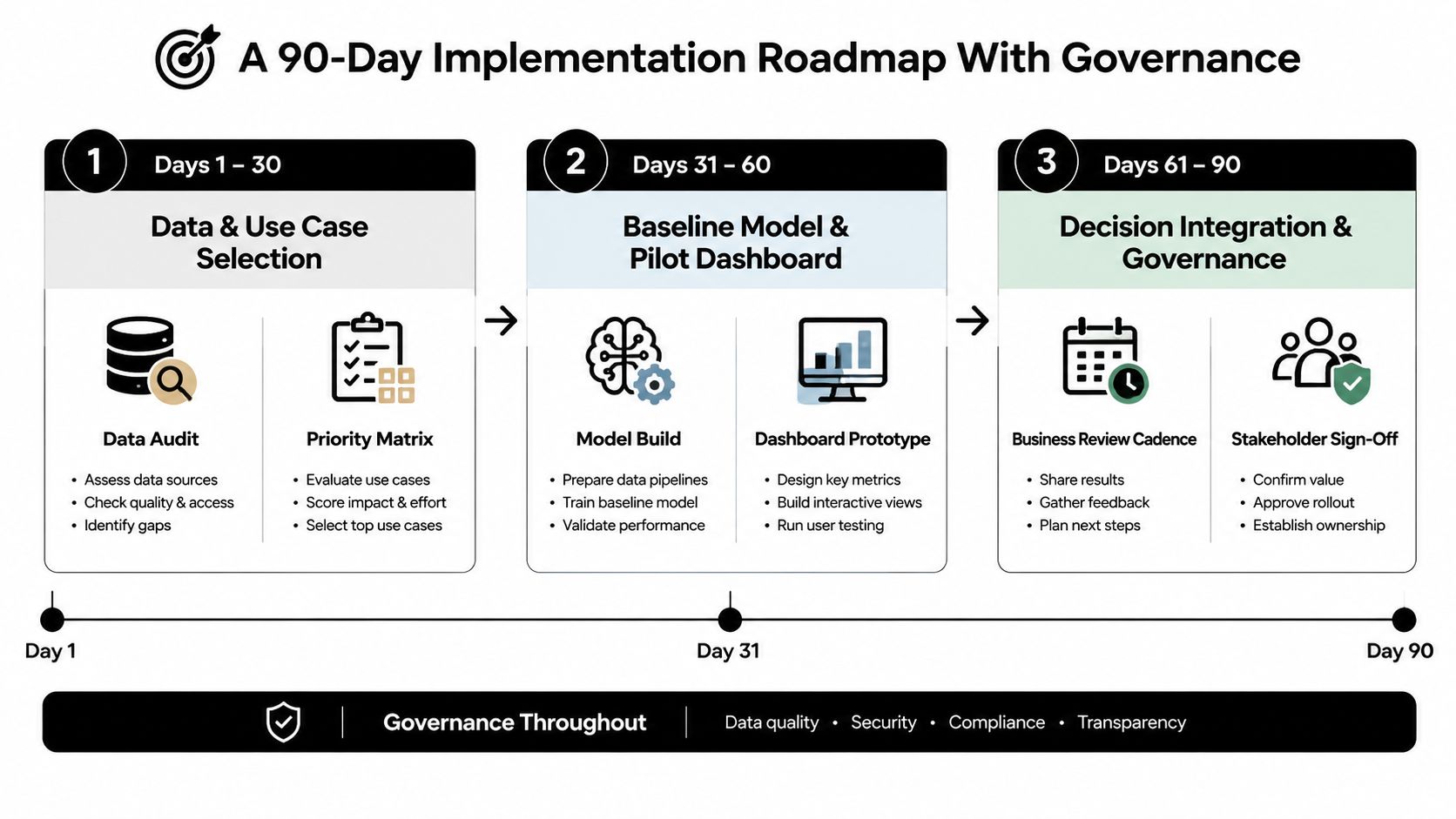
Set the governance cadence before launch. Review forecast accuracy monthly, convene a quarterly planning council with CHRO and CFO representation, and recalibrate the model annually. Maintain a change-control log for assumptions such as attrition and ramp time, so finance can distinguish a changed forecast from a changed model.
A short implementation explainer can reinforce the operating sequence:
<iframe width="100%" style="aspect-ratio: 16 / 9;" src="https://www.youtube.com/embed/hVClgbOXR1Q" frameborder="0" allow="autoplay; encrypted-media" allowfullscreen></iframe>
Watch for scope creep, missing data contracts, and orphan dashboards. If no business leader references the output during an operating review, the program has produced reporting rather than a working decision process, regardless of how advanced the model appears.
What Good Workforce Planning Analytics Looks Like
Analytics-mature teams behave differently in five observable ways.
1. They refresh scenarios on a recurring planning cadence. Quarterly refreshes are more useful than an annual model that becomes stale as soon as assumptions change. 2. They report uncertainty. Confidence intervals, forecast error, and input drift appear beside the point estimate. 3. They tie plans to budget lines. Each recommended hire, redeployment, or reskilling action has an accountable owner and a financial consequence. 4. They version-control assumptions. The team can identify which model version used a particular attrition, ramp, cost, or demand assumption. 5. They preserve decision lineage. Every output traces back to a named dataset, timestamp, transformation, and approval record.
These habits make the model inspectable. They also prevent a common misunderstanding: precision in a spreadsheet isn't the same as confidence in a decision.
Warning signs of a fragile program
A program is at risk when a single analyst's spreadsheet contains the only working logic. It's also fragile when nobody outside HR references the forecast, or when the dashboard is rebuilt manually during every planning cycle. Those symptoms indicate that the organization has produced reporting, not an operating capability.
The strongest workforce planning analytics systems function as decision systems. The CFO opens them during operating reviews because the outputs connect labor capacity to cost, margin, and execution. The CHRO uses them to explain not only what talent is required, but why a particular intervention is preferable under the current scenario.
Synopsix offers behavioral assessments, comparable profiles, intelligence reports, predictive simulations, and Human Interlink analysis that can add evidence about fit, friction, and team complementarity to workforce decisions. Visit [Synopsix](https://synopsix.ai) to evaluate how people intelligence could complement your workforce planning analytics model and turn talent signals into more actionable hiring, team design, and development choices.